An agentic AI roadmap takes you from Python and LLM basics to building agents that plan, use tools, and act on their own. The path runs through prompting, retrieval, memory, agent frameworks, multi-agent systems, and deployment, in that order.
What Agentic AI Actually Means
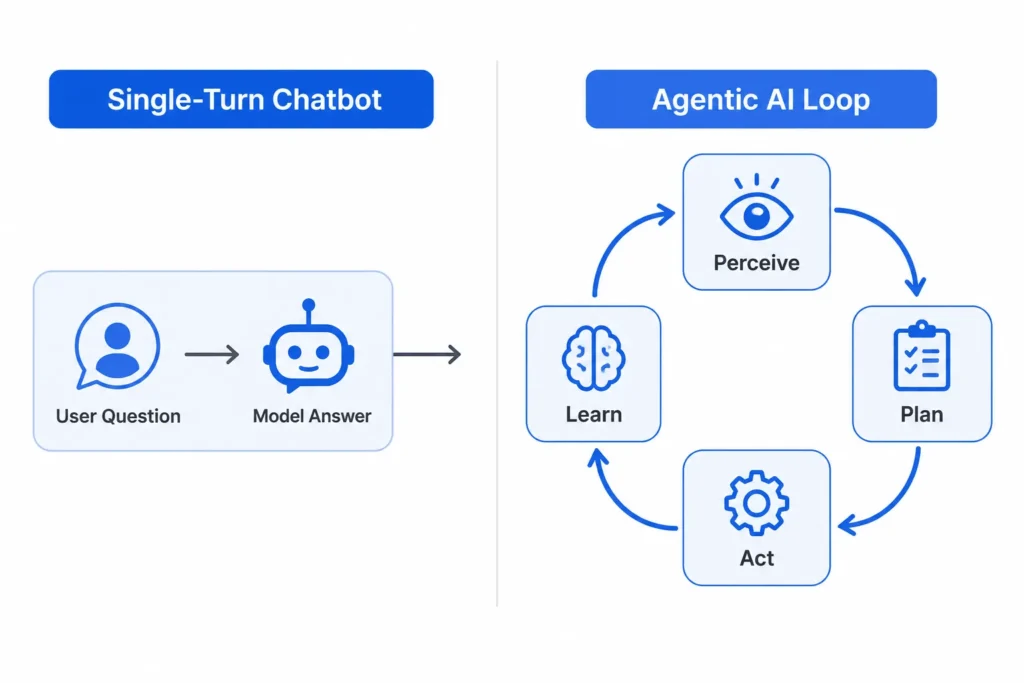
Agentic AI is software that can perceive a situation, decide what to do about it, take action, and adjust based on the result, without a person approving every step. A regular chatbot answers one question and stops. An agent can open a ticket, check three data sources, draft a reply, and send it, then log what happened for the next run.
The difference matters for anyone planning to learn this stuff. You are not just studying prompt engineering. You are learning how to wire a language model into a system that has state, tools, and a job to finish.
Why This Skill Set Is Worth Learning Now
Gartner listed agentic AI as a top technology trend for 2026, and a Deloitte forecast expects half of companies already using generative AI to run autonomous agents by 2027. That is not a small niche. Companies are hiring for it under titles like AI engineer, agent developer, and applied AI engineer, and most job posts ask for the same core skills: Python, an LLM API, a vector database, and at least one agent framework such as LangChain, LangGraph, CrewAI, or AutoGen.
The roadmap below is ordered the way most working engineers actually learned it: foundations first, then a single working agent, then multiple agents working together, then the unglamorous parts like evaluation and deployment that decide whether the thing survives contact with real users.
Step 1: Lock Down The Foundations
Before touching any agent framework, you need three things solid: Python, the basics of machine learning, and a working understanding of how large language models generate text.
1. Python and core programming
You do not need advanced software architecture. You need to be comfortable with functions, classes, async code, and calling REST APIs, since almost every agent framework leans on async calls to the LLM and to external tools.
2. Machine learning basics
You do not need to train models from scratch, but you should know the difference between supervised learning, unsupervised learning, and reinforcement learning, and understand roughly how a transformer processes tokens. This context makes later concepts like temperature, context windows, and fine-tuning easier to reason about instead of just copying settings from a tutorial.
Step 2: Get Fluent In LLMs And Prompting
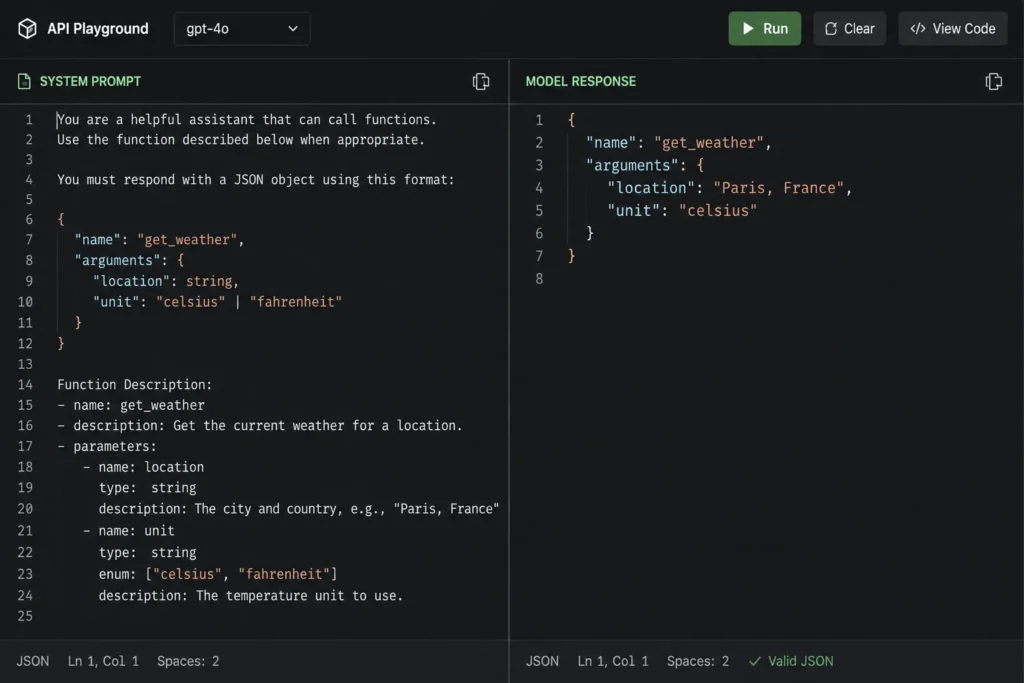
Once the fundamentals are in place, spend real time inside an LLM API, whether that is OpenAI, Anthropic, or an open-weight model through a provider like Together or Groq. Learn system prompts, few-shot examples, structured output (JSON mode or function-calling schemas), and how context window limits force you to summarize or truncate.
This is also where prompt engineering earns its place in the roadmap, not as the whole skill but as the interface layer between your code and the model’s reasoning. A well-structured prompt with clear instructions and output format still beats a clever one-liner, especially once an agent has to parse that output automatically in the next step.
Step 3: Add Retrieval And Memory
An agent that only knows what was in its training data is limited. Retrieval-augmented generation, or RAG, lets an agent pull in your documents, your database rows, or your product catalog before it answers.
1. Building a basic RAG pipeline
The typical stack is: split documents into chunks, embed those chunks with an embedding model, store the vectors in a database like Pinecone, Weaviate, or Chroma, then retrieve the closest matches at query time and feed them into the prompt. Get one small RAG pipeline working end to end, even on a folder of ten PDFs, before moving on.
2. Short-term and long-term memory
Memory is different from retrieval. Short-term memory is the running conversation the agent needs to stay coherent across a task. Long-term memory is what persists between sessions, like user preferences or past decisions, usually stored in the same vector database or a separate key-value store. Agents that forget everything after one run cannot handle multi-step or recurring work, which is most of the real use cases.
Step 4: Learn An Agent Framework
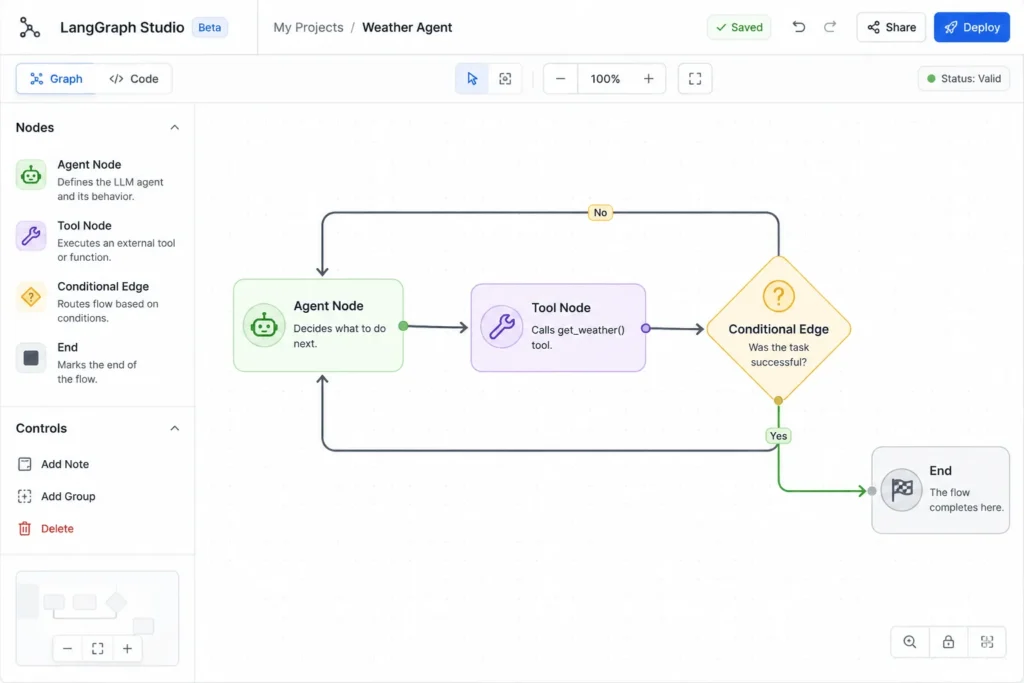
This is where the pieces come together. LangChain and LangGraph give you graph-based control over an agent’s steps, which helps when you need explicit branching logic. CrewAI and AutoGen are built around defining multiple roles, such as a researcher agent and a writer agent, that hand work to each other.
Pick one framework and build something small end to end, for example an agent that reads a CSV, answers questions about it, and calls a plotting tool when asked for a chart. Don’t try to learn all four frameworks before shipping anything. The concepts transfer between them once you understand one properly.
Step 5: Connect Agents To Real Tools
An agent that cannot act on the world is just a chatbot with extra steps. Tool use means giving the model a defined set of functions, such as search_web, run_sql_query, or send_email, along with a schema describing their inputs, and letting the model decide when to call them.
Start with read-only tools like a search API or a database query function, since mistakes there are cheap. Once you trust the agent’s tool selection, add write actions such as sending messages or updating records, and add a human approval step for anything irreversible, at least while you are still testing.
Step 6: Build Multi-Agent Systems
Single agents hit a ceiling on complex tasks because one model juggling research, writing, and review at once tends to drop context or lose focus. Multi-agent systems split that work: a research agent gathers information, a writing agent drafts content, and a critic agent checks the draft against the original request before anything ships.
Coordination between agents needs a defined protocol: a shared message format, a way to route tasks to the right agent, and a way to know when a task is actually done rather than just handed off. Frameworks like CrewAI and AutoGen build this coordination in, but understanding it manually first will save you debugging time later.
Step 7: Test, Evaluate, And Deploy
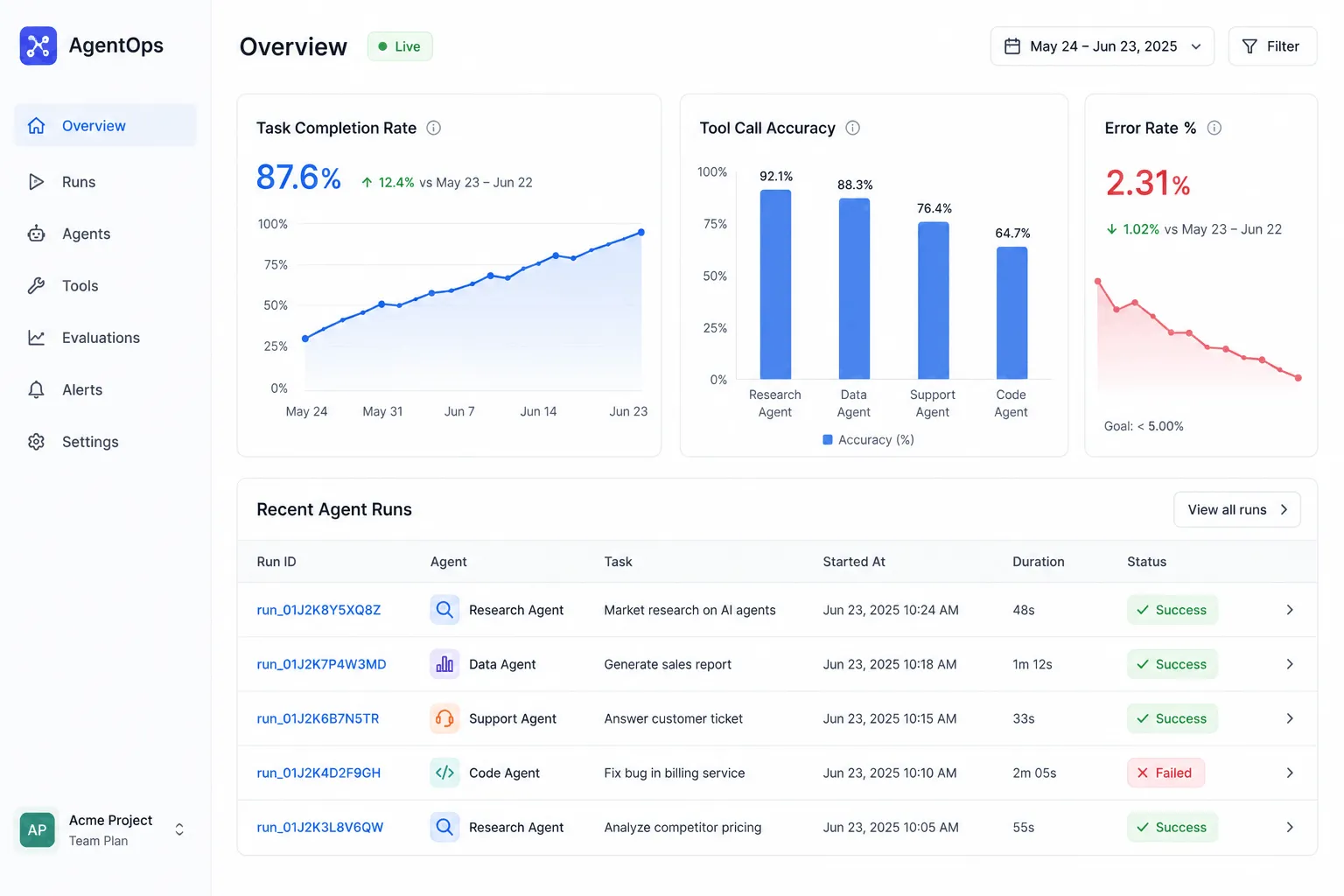
An agent that works once in a demo is not the same as an agent that works reliably. Evaluation for agentic systems checks more than the final answer. You need to look at task completion rate, reasoning quality, correct tool selection, response consistency across repeated runs, and how the agent handles errors from a failed API call or a bad tool response.
For deployment, most people prototype locally with a small dataset, then move to a cloud environment such as AWS, GCP, or Azure once they need to handle real traffic, multiple users, or larger data volumes. Add logging and monitoring from day one. When an agent takes an unexpected action in production, you need a trace of exactly what it saw and decided, not just the final output.
Step 8: Build A Portfolio That Shows The Work
Employers want to see finished, documented projects more than certificates. Three projects cover most of what this roadmap teaches: a RAG-based question-answering agent over a document set, a tool-using agent that completes a real task like calendar scheduling or data lookup, and a multi-agent system where roles are clearly divided.
For each project, document the architecture, the tools it uses, and at least one edge case you handled, such as what happens when the agent’s tool call fails or returns nothing. That documentation is often what separates a portfolio piece from a genuinely useful signal to a hiring manager.
Common Mistakes People Make On This Roadmap
Jumping straight into a framework like LangGraph before understanding basic prompting leads to debugging sessions where you cannot tell if the bug is in your code or in how you’re talking to the model. Skipping evaluation is another common one. It is easy to demo an agent that works three times in a row and assume it’s done, then watch it fail on the fourth run because nobody checked consistency.
The other mistake is learning every framework shallowly instead of one framework deeply. Depth in one tool teaches you the underlying patterns, agent state, tool schemas, memory handling, that transfer to any other framework you pick up later.
Frequently Asked Questions
1. How long does it take to learn agentic AI?
Someone with existing Python and basic ML knowledge can build a working single-agent project in four to six weeks of consistent study. Reaching comfort with multi-agent systems and deployment usually takes another two to three months of hands-on project work.
2. Do I need a machine learning degree to start?
No. You need working Python skills and a basic grasp of how machine learning models are trained and evaluated. Most agentic AI work uses pretrained LLMs through an API, so you are not training models from scratch.
3. Which agent framework should I learn first?
LangChain or LangGraph is a reasonable starting point because the ecosystem and documentation are large, and the concepts, such as tool nodes and conditional routing, map directly onto CrewAI and AutoGen if you switch later.
4. Is agentic AI the same as AI agents?
The terms are used interchangeably in most job postings and courses. Agentic AI usually refers to the broader approach, systems that plan and act autonomously, while an AI agent is one instance of that system built for a specific task.
5. What’s the difference between RAG and an AI agent?
RAG is a technique for pulling in outside information before the model answers. An agent can use RAG as one tool among several, alongside things like code execution or API calls, and it decides on its own when retrieval is actually needed for the task at hand.