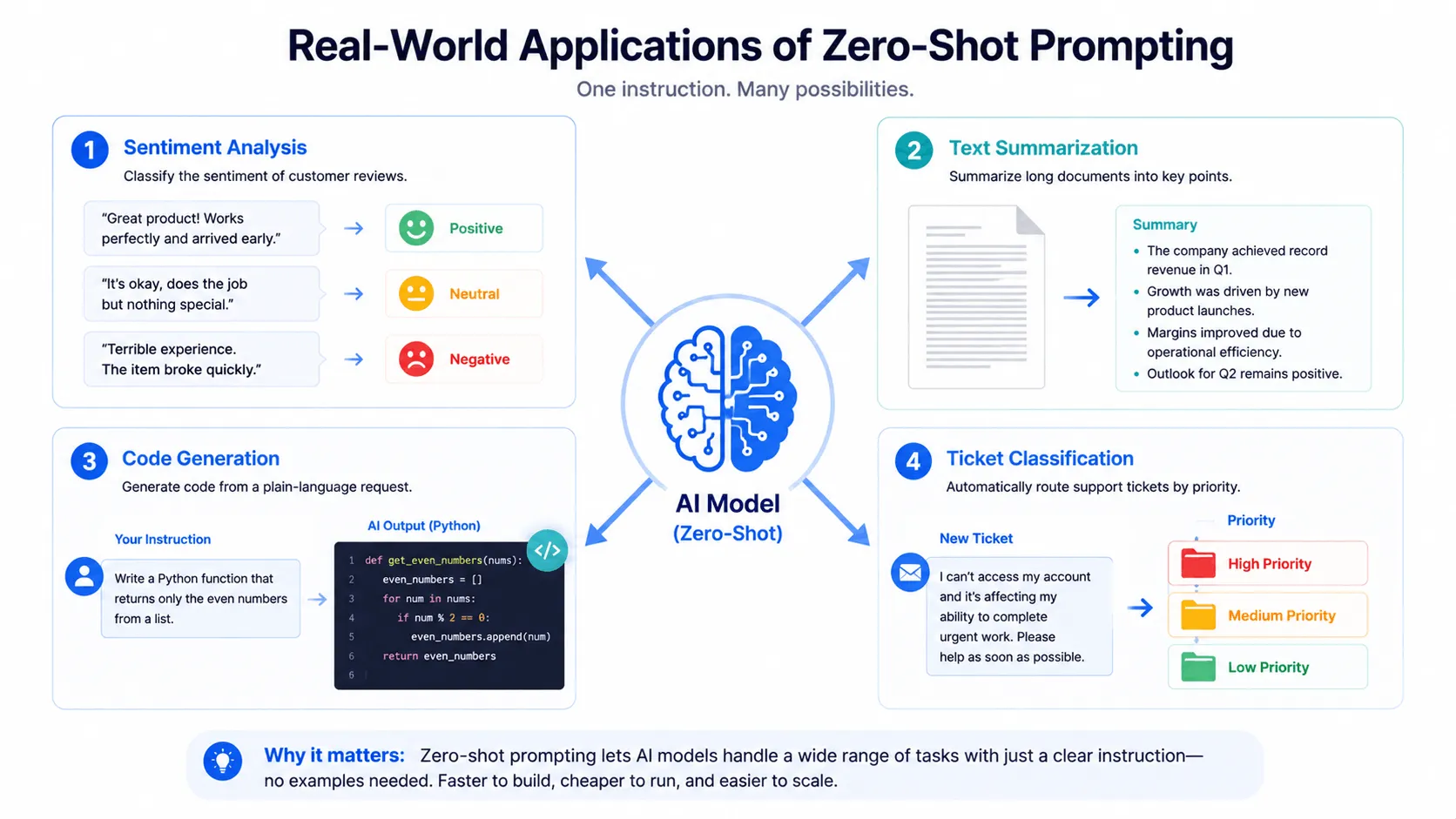
Zero-shot prompting is asking an AI model to complete a task using only an instruction, with no examples included in the prompt. The model relies entirely on what it learned during training to figure out what you want and how to format the answer.
What Zero-shot Prompting Actually Means
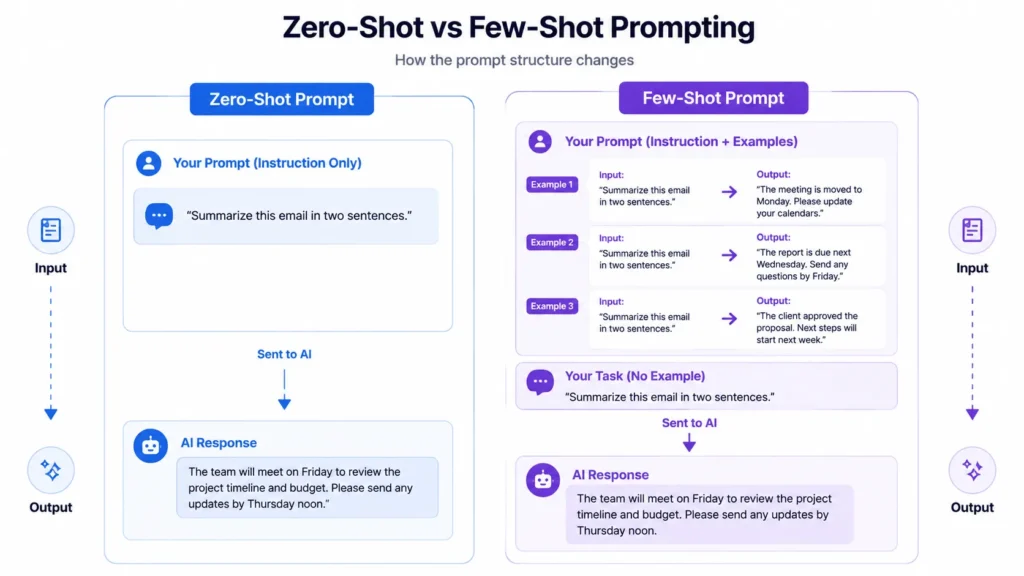
A zero-shot prompt contains a task description and nothing else. No sample input, no sample output, no “here’s what good looks like.” You type “Summarize this email in two sentences” and the model goes straight to work.
This works because instruction-tuned models like GPT-4, Claude, and Gemini are trained on huge volumes of text that already contain millions of examples of summarizing, classifying, translating, and writing. When you give the model a plain instruction, it draws on patterns it already learned rather than patterns you show it in the moment. That’s the difference between zero-shot and few-shot prompting: few-shot hands the model two or three worked examples before asking it to repeat the pattern; zero-shot skips that step entirely.
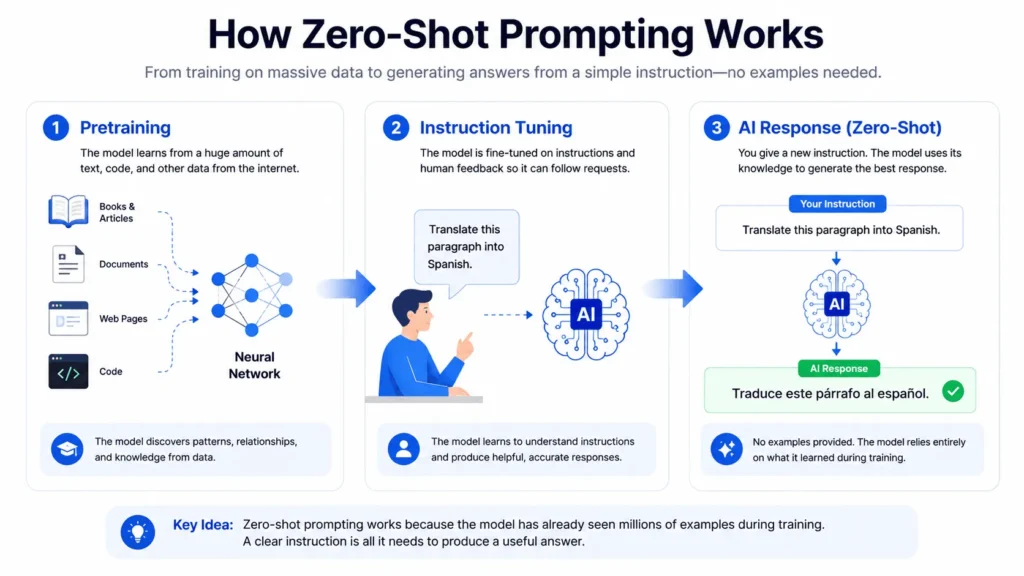
How Zero-shot Prompting Works under the Hood
Two training stages make zero-shot prompting possible. Pretraining exposes a model to a large slice of the internet, so it picks up statistical patterns about how tasks and language relate to each other. Instruction tuning then teaches the model to treat a plain-language request as a command rather than just more text to predict.
Reinforcement learning from human feedback (RLHF) adds a second layer on top: the model is rewarded for actually doing what a person asked, even when no examples are given. That’s why zero-shot performance has jumped since 2022. Early GPT-2 style models needed examples for almost everything. Current instruction-tuned models handle a much wider range of tasks from a single sentence of instruction.
Zero-Shot, One-shot, and Few-Shot Prompting Compared
The three sit on a spectrum defined by how many examples you give the model before asking it to perform.
Zero-shot gives zero examples and depends fully on the instruction being clear. One-shot gives a single example, useful when you need the model to match a specific format or tone but don’t want to spend a lot of tokens on demonstrations. Few-shot gives two or more examples and tends to help most on tasks where the output format is inconsistent or the domain is specialized, such as legal or medical text.
None of the three is universally “better.” A support ticket classifier with three clean categories usually works fine zero-shot. A ticket classifier with fifteen overlapping, company-specific categories usually needs a few examples so the model can see how you draw the lines.
When Zero-Shot Prompting Works Well
Zero-shot prompting is a good fit when the task is common enough that the model has almost certainly seen thousands of similar examples during training. Sentiment classification, basic text summarization, simple translation, generic code generation, and straightforward Q&A all fall into this bucket.
It also has practical advantages beyond accuracy. Shorter prompts mean fewer input tokens, which lowers cost at scale. There’s no need to collect, label, or maintain a set of example demonstrations, and prompts are faster to write and test since you’re iterating on a single instruction instead of a curated set of examples.
When Zero-Shot Prompting Falls Short
Zero-shot prompting struggles once a task gets specific or the output format needs to be exact. If you ask for a list and sometimes get bullets, sometimes numbers, and sometimes a paragraph, that’s a sign the model needs an example to anchor the format. Specialized domains with their own conventions, like contract review or clinical notes, also tend to need at least one demonstration so the model matches the terminology you expect.
Reasoning-heavy tasks are a partial exception. Research on zero-shot chain-of-thought, where you add a phrase like “let’s think step by step” to the prompt, has found it can outperform few-shot prompting on math and logic problems, because worked examples sometimes bias the model toward copying a flawed reasoning pattern instead of reasoning through the problem itself.
How to Write a Zero-Shot Prompt that actually works
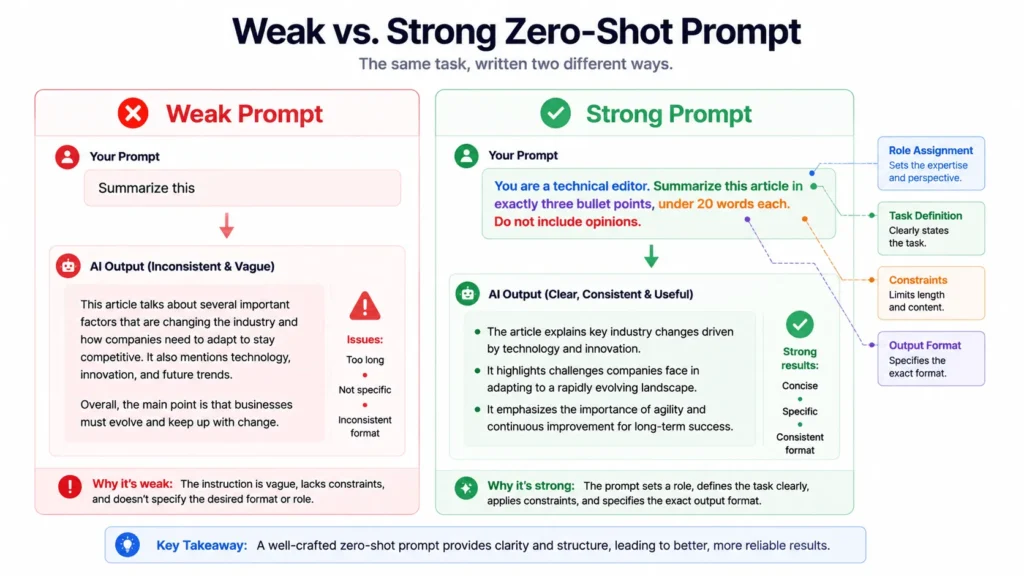
A weak zero-shot prompt is usually vague, not under-engineered. Four adjustments consistently improve results.
State the task and the constraints in the same sentence. “Summarize this in three bullet points, under 20 words each” outperforms “summarize this” because the model isn’t left guessing at length or format.
Assign a role when domain knowledge matters. Starting a prompt with “You are a backend engineer reviewing this function for edge cases” activates different patterns than a prompt with no role at all, and it costs almost nothing to add.
Set explicit boundaries. Telling the model what not to do, such as “don’t use deprecated APIs” or “don’t invent statistics,” heads off common failure modes before they happen.
Reword before you add examples. If a zero-shot prompt isn’t working, a clearer instruction often fixes it faster than jumping straight to few-shot. Save the examples for cases where rewording genuinely hits a wall.
Zero-Shot Prompting in Coding and Classification Tasks
Zero-shot prompting is the default mode for most AI coding tools, since it’s not practical to hand-write examples for every possible function a developer might request. A prompt like “write a Python function that returns only the even numbers from a list” works without any demonstration because the model has seen enormous numbers of similar function definitions during training.
Classification is the other place zero-shot shows up constantly, from routing support tickets by urgency to tagging text by sentiment. IBM’s documentation on the topic describes testing zero-shot prompting on an IT ticket classifier that sorts issues into “High,” “Medium,” and “Low” using only a task description and category definitions, with no labeled examples included in the prompt.
Getting Started with Zero-shot Prompting
Start every new task zero-shot. Write one clear, specific instruction and check the output. If the format is inconsistent or the model keeps missing the same detail, add one example before reaching for a full few-shot setup. For reasoning tasks, try “let’s think step by step” before adding examples at all. Most requests you’ll ever send an AI model don’t need more than a well-written instruction.
Frequently asked questions
1. Is zero-shot prompting the same as no prompting at all?
No. A zero-shot prompt still needs a clear instruction. “Zero-shot” refers to the absence of examples, not the absence of guidance.
2. Does zero-shot prompting work for every model?
It works best on instruction-tuned models such as GPT-4, Claude, and Gemini. Older or non-instruction-tuned models generally need more explicit formatting cues or examples to perform reliably.
3. When should I switch from zero-shot to few-shot?
Switch when the output format is inconsistent across runs, when the task involves specialized terminology the model isn’t matching, or when you’ve already tried rewording the instruction and results still aren’t stable.
4. Can zero-shot prompting hurt performance on reasoning tasks?
It’s rarely worse, and can outperform few-shot on math and logic problems, especially when combined with a step-by-step instruction. Few-shot examples on reasoning tasks can sometimes bias the model toward copying flawed steps from the examples.
5. Is zero-shot prompting cheaper than few-shot prompting?
Yes, in terms of token usage. A zero-shot prompt is just the instruction, while a few-shot prompt includes multiple examples, which adds input tokens on every request.