
Most people form an opinion about you before you say a word. A recruiter, client, landlord, or new connection types your name into a search bar and decides within seconds. Learning how to polish online presence gives you control over what they see. This guide walks you through nine steps, from a first search audit to a simple upkeep routine. Each step is practical, and you can finish the full process in about a month.
Why a Polished Online Presence Matters
Your online presence is everything a search engine and social platform can show about you. That includes profiles, tagged photos, comments, old forum posts, and news mentions. People rarely look past the first page of results, so a handful of links shape your reputation. A gap matters too. An empty search result can raise questions about whether you are active in your field. Polishing does not mean looking perfect. It means making sure what appears is accurate and matches who you are today.
Step 1: Google Yourself and Audit the Results
Open a private browser window so personalized results do not skew what you see. Search your full name, then your name plus your city, employer, and school. Check the web results, the image tab, and the news tab.
Write down everything that appears in a simple list. Mark each link as keep, fix, or remove. This list becomes your to-do list for the rest of the guide.
What to Look For
- Old accounts you forgot, such as forums, blogs, or photo sites
- Public posts or comments that no longer reflect you
- Wrong or outdated details, including old job titles or addresses
- Data broker pages that list your phone number or address
- Someone else with your name, which can mix up your results
Most data broker sites have an opt-out form, though each one asks for a separate request.

Step 2: Decide What Impression You Want to Make
A polished presence has a point of view. Before editing anything, write one sentence that describes who you are professionally and what you want next. For example: “Data analyst who turns messy sales numbers into clear decisions.” Every profile you touch should support that sentence.
Think about your audience. A hiring manager wants evidence of skills. A potential client wants proof you solve their problem. A new contact wants to know what you care about. The same facts can be framed differently for each, but the core message stays the same.
Step 3: Clean Up Old Posts, Tags, and Photos
Go through each social account from newest to oldest. You do not need to delete your history. Remove content that is hostile or easy to take out of context. Look hardest at old jokes, heated arguments, and photos that show you at your worst.
Tags need separate attention. Other people can attach your name to content you never approved. Turn on tag review so you approve each tag before it appears on your profile. Ask friends to remove anything you cannot control yourself.
If a post is harmless, leave it. If you doubt it, archive or hide it. Wiping an entire account leaves an empty profile, which can raise its own questions.
Step 4: Set Privacy Settings That Match Your Goals
Privacy and polish work together. Decide which accounts are professional and public, and which are personal and private. A private personal account is a smart choice, but it will not help your search results if everything else is empty.
Review these settings on every platform:
- Who can see your posts, friends list, and followers
- Who can find you by email address or phone number
- Which third-party apps and games still have access to your account
- Whether search engines can index your profile
Revoke access for apps you no longer use. Old connections can expose data long after you stop using a service. Then check your settings again every few months, since platforms change defaults without much notice.
Step 5: Update Your Professional Profiles
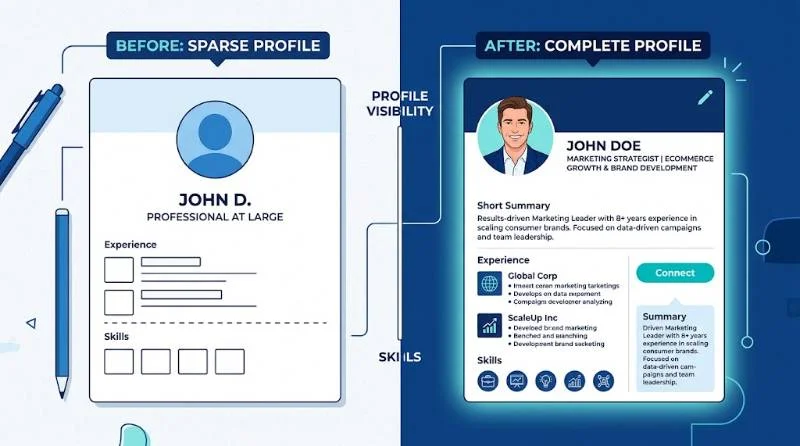
LinkedIn is often the first professional result for a name, so give it the most attention. Other platforms matter based on your field. Designers lean on Behance, developers on GitHub, and writers on a portfolio site.
1: Write a Headline That Says What You Do
Your headline appears beside your name in comments, messages, and connection requests. Replace a bare job title with your specialty and the value you offer. “Marketing manager” says little. “B2B marketing manager who grows pipeline through content” says a lot.
2: Choose a Clear Photo
Use a recent photo where your face is easy to see. Natural light and a plain background work well. You do not need a studio shoot. Crop out other people and avoid heavy filters.
3: Fill in the About Section With Real Results
Write in first person and lead with what you do best. Add two or three concrete results, such as a project you shipped or a goal you hit. Finish with the type of work you want. Use the words people in your field would search for, so profile search can find you.
4: Add Proof, Not Just Claims
Use the featured section for a portfolio piece, article, or presentation. Ask former colleagues for short recommendations that name specific results. Two strong recommendations beat ten vague ones.
Step 6: Make Your Profiles Consistent
Inconsistency makes people doubt which details are true. Use the same name, similar photo, and matching job history across platforms. If you go by a nickname, use it everywhere or nowhere.
Pick one username and reuse it where possible. Link your profiles to each other so a visitor can move between them easily. Make sure the link to your best page, often LinkedIn or your website, sits in every bio.
Step 7: Build a Simple Personal Website
A personal website gives you a search result you fully control. A single page is enough. Include your name, a short bio, your best work, and a way to contact you. Buy a domain that matches your name, such as yourname.com, and use a professional email address on it.

For freelancers and consultants, the site should show past projects and client results. For job seekers, it can link to a resume, portfolio, or published writing. Keep it fast, mobile friendly, and updated.
Step 8: Share Content That Shows Your Expertise
Cleanup is half the job. Active profiles look more credible than silent ones. Share articles from your field with a short comment about why they matter. Post about a project, a lesson, or a problem you solved. Comment thoughtfully on other people’s posts.
You do not need to post daily. One or two quality updates a week is a sustainable pace for most people. Stay professional, and avoid oversharing personal details or attacking others in public threads.
Step 9: Set Alerts and Keep Your Presence Current
Create a Google Alert for your full name so you learn when new pages mention you. Add a second alert for your name plus your company if you want extra coverage. Check your name search once a quarter and repeat the audit from step one.
Update profiles whenever something meaningful changes, such as a new role, certification, or published article. A profile that ends two jobs ago looks neglected, even if it is accurate.
When This Advice Does Not Apply
Not every step fits every person. A few common situations need a different approach.
1: You Have a Very Common Name
Add a middle initial or a professional descriptor to your profiles, such as Jane R. Smith, Product Designer. Use that exact version everywhere so searches for it favor your pages. A personal website under that name helps a lot.
2: You Want to Stay Mostly Private
Some people have good reasons to avoid public profiles, such as safety concerns or sensitive jobs. You can still polish your presence by locking down personal accounts and keeping one minimal professional page. Keep it to facts you are comfortable sharing.
3: You Run a Business or Work as a Creator
Your business pages count as part of your online presence. Check that your hours, address, and reviews are accurate, and reply to feedback calmly. A founder’s personal profile and the company page should tell the same story.
Common Mistakes to Avoid When You Polish Online Presence
Several errors undo good work.
- Deleting every account instead of cleaning them up
- Using a different bio or job history on each site
- Posting a flurry of content for a week and then going silent
- Ignoring old accounts that still appear in search
- Assuming private settings hide you from search results entirely
Fix these early and the rest of the process becomes much easier.
A Simple 30 Day Plan to Polish Your Online Presence
Week one: run the search audit and list everything to fix. Week two: clean up posts, tags, and privacy settings. Week three: rewrite your headline, about section, and photo, then match your other profiles. Week four: publish a simple website page, set your alerts, and share your first post. After that, a short quarterly check keeps everything fresh.
Small, steady changes beat a single weekend of panic edits. Your goal is a results page that matches the person you are now. Anyone who looks you up should find a clear and accurate picture.