If you’re wondering does SafeAssign detect AI before you submit an assignment on Blackboard, the direct answer is no. SafeAssign is a text-similarity tool. It compares your writing against a database of existing sources and flags overlapping text. It was never built to identify whether a sentence came from a person or a language model, and its underlying design still reflects that original purpose.
That doesn’t mean AI-written work is automatically safe to submit. A clean SafeAssign report tells you something specific: your wording doesn’t closely match anything in its database. It says nothing about who or what wrote the sentences. Understanding that distinction matters more than the score itself.
What SafeAssign Actually Is and Does
SafeAssign has been part of Blackboard since 2007, long before generative AI tools existed in classrooms. It was built to catch traditional plagiarism: copying from a published paper, reusing a classmate’s essay, or lifting text from a website without citation.
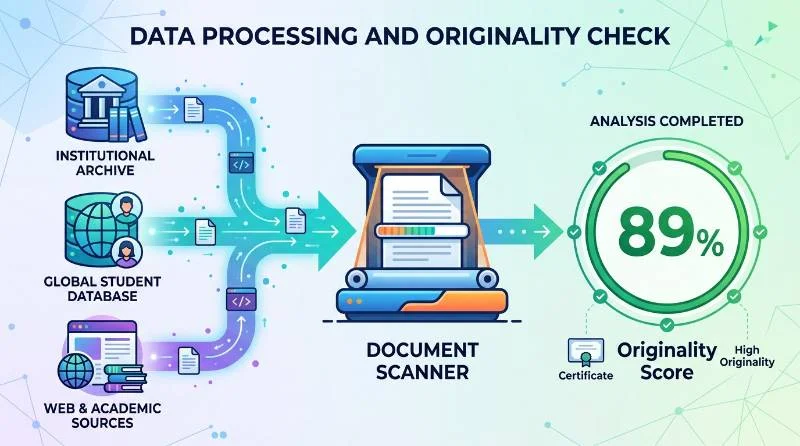
When you submit a paper, SafeAssign checks it against three main sources. The first is your institution’s own archive of previously submitted student work. The second is the Global Reference Database, which pools submissions across schools that use SafeAssign. The third is a broad index of internet content and academic publications, including licensed databases of journal articles.
The output is a similarity percentage and a color-coded Originality Report. Matched passages are highlighted with links back to the source they resemble. Instructors then decide whether a match is a properly cited quote, a coincidence of common phrasing, or genuine plagiarism.
How the SafeAssign Algorithm Works
SafeAssign relies on a technique called shingling. Your submission is broken into overlapping sequences of words, and those sequences are compared against sequences in its databases. When enough shingles from your paper match shingles from an existing source, the passage gets flagged as similar.
This approach is effective at catching copied or lightly reworded text, because copied text leaves a matching fingerprint somewhere in the database. It has nothing to do with how the sentence was produced. A shingle-matching system only asks one question: does this sequence of words already exist somewhere else?
AI detectors ask a completely different question. They analyze patterns like perplexity, which measures how predictable each word choice is, and burstiness, which measures how much sentence length and structure vary across a passage. Human writing tends to be less uniform in these measures than machine-generated text. SafeAssign’s architecture was never built to run this kind of stylistic analysis, which is the real reason it misses AI writing.
Why AI-Generated Text Slips Past SafeAssign
AI models generate original word sequences based on probability, not by retrieving stored sentences from a database. When a language model writes an essay from scratch, there is usually nothing in SafeAssign’s index for that specific wording to match against.
The practical result is that a fully AI-written paper, with no copied phrases and no overlap with existing sources, tends to return a similarity score near zero. That low score can look reassuring, but it reflects the absence of copying, not the absence of AI involvement. Two very different problems produce the same clean-looking report.
Did SafeAssign Add AI Detection in 2024?
You may come across claims that SafeAssign quietly added an AI-writing classifier in 2024. This is one of the most common points of confusion around the tool, and it’s worth addressing directly because the sources disagree.
Blackboard’s parent company has publicly acknowledged concerns about the reliability of AI-detection technology in its own guidance for instructors, and it has not shipped a dedicated AI-writing score inside SafeAssign itself. What has happened is that separate detection tools, particularly Copyleaks, can be enabled through Blackboard’s integration marketplace. When an institution turns that on, students see an AI indicator alongside the SafeAssign report, but it comes from a different system running in parallel, not from SafeAssign’s own algorithm.
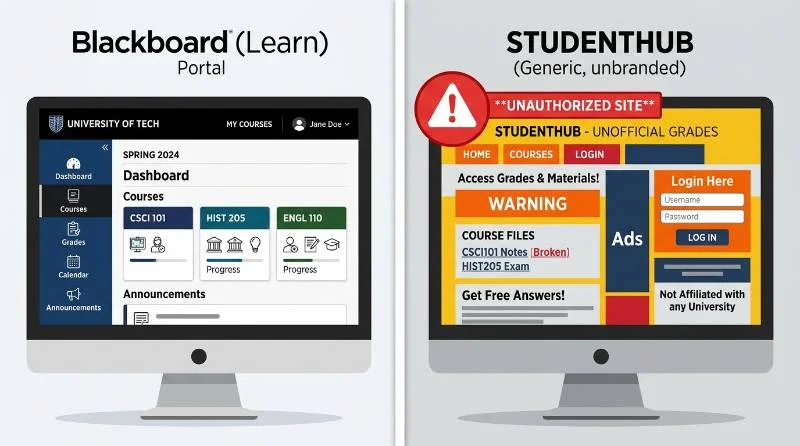
You’ll also find websites using names like “SafeAssign AI Checker” that are unaffiliated third-party products built to capture search traffic around this exact question. They are not run by Blackboard, and results from them tell you nothing about what your actual instructor will see. If you want to know what’s enabled for a specific assignment, check the submission page in Blackboard itself, where the review options for that assignment are listed.
When AI Content Can Still Get Flagged
There are specific situations where AI-generated writing does trigger a SafeAssign match, even though the tool isn’t looking for AI itself.
If an AI tool produces text that closely resembles a widely available source, such as a well-known explanation on a reference site, that overlap can register as a match. This happens because many models are trained on that same public content, so their phrasing sometimes converges with it.
Reused AI output creates a second risk. Once a paper has been submitted to a school using SafeAssign, that text enters the Global Reference Database. If you or another student submits a similar AI-generated response to a common prompt, later, closely related submissions can match each other.
Light paraphrasing of existing text, sometimes called patchwriting, is also caught reliably. Swapping a few words in a sentence while keeping its structure intact is exactly the kind of near-match shingling was designed to detect, regardless of whether a person or an AI tool did the paraphrasing.
A Low Score Isn’t Proof Your Work Is AI-Free
Treat a low SafeAssign percentage as evidence about copying, not as evidence about authorship. Many schools understand this gap and layer additional tools on top of SafeAssign for exactly this reason.
Turnitin and Copyleaks are the two most commonly used add-ons, and either can be enabled independently of SafeAssign at the institutional level. Some schools run one of these on every submission. Others enable them only for specific courses or assignment types, often at the instructor’s discretion.
Before you assume a clean score means you’re covered, check what’s actually active for the assignment. Blackboard’s submission page shows which checks apply, and your syllabus or course instructions usually state which tools your instructor uses beyond the automated report.
SafeAssign vs Turnitin, in Practical Terms
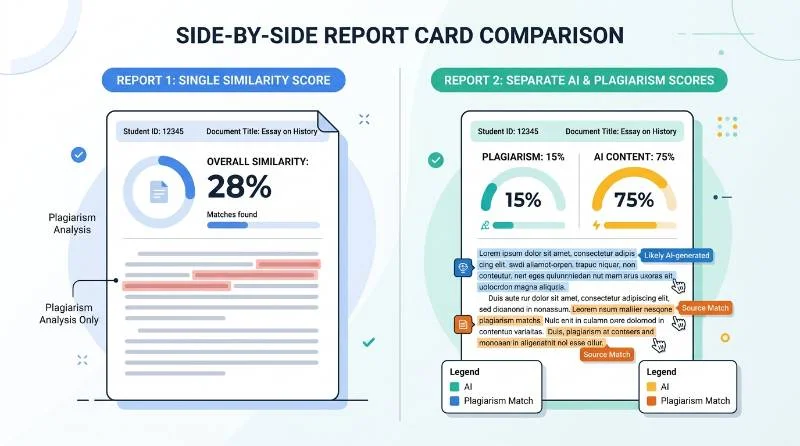
The core difference comes down to what each tool was designed to measure. SafeAssign produces one similarity score based on text matching. Turnitin produces two separate outputs on the same document: a similarity score for copied content and a distinct AI-writing percentage based on stylistic analysis.
Turnitin also flags AI-suspected content at the sentence level, so an instructor can see exactly which portions of a paper triggered the flag rather than a single document-wide number. SafeAssign has no equivalent sentence-level AI view, because it isn’t running that kind of analysis in the first place.
If your school licenses both tools, your exposure to AI detection depends on Turnitin’s layer, not SafeAssign’s. If your school only has SafeAssign with no additional AI tool enabled, there is currently no automated AI-writing check running on your submission at all.
Detection Isn’t the Real Risk, Policy Is
Even where no tool flags anything, using AI to write graded work without permission is usually still a policy violation on its own terms. Academic integrity rules at most schools now address AI use directly, separate from plagiarism rules, and those rules apply whether or not any software catches the text.
That distinction matters because it removes the incentive to treat detection avoidance as the goal. An instructor who suspects AI use can also compare a paper’s tone against your prior submitted work, ask follow-up questions about your reasoning, or request a rewrite under supervision. None of that depends on SafeAssign’s score.
If your program allows AI for brainstorming, outlining, or grammar checks but not for drafting full sections, that line is usually spelled out in the syllabus. Reading it before you start is faster than guessing after the fact.
How to Use AI Without Guessing About Detection
Rather than trying to predict what SafeAssign will or won’t catch, a more reliable approach is checking your specific situation directly. Look up your institution’s academic integrity policy on AI, since these vary significantly between programs and even between individual instructors.
Ask your instructor directly if a policy isn’t clear, particularly for research papers where AI-assisted outlining might be acceptable even if AI-drafted paragraphs aren’t. If disclosure is permitted, note where and how you used AI assistance rather than leaving it ambiguous. Treat AI tools as support for organizing ideas or improving clarity on your own draft, not as a substitute for writing the paper yourself, since that keeps you clear of both detection concerns and the underlying policy risk.