
Patch management tools automate the process of finding, testing, and installing software updates across every device on a network, so IT teams don’t have to chase each machine by hand. The right tool closes security gaps faster and cuts down on the manual work that eats up an IT team’s week.
The market is crowded, and most comparison pages just rank vendors without explaining what actually separates a solid tool from a shiny dashboard. This piece walks through the features that matter, the categories of tools available, and how to match one to your environment.
What Patch Management Tools Actually Do
At the core, these platforms handle four jobs: scanning devices to find what’s missing, pulling the correct patches from vendors, pushing them out on a schedule, and confirming the install actually succeeded. Most also flag which endpoints are still exposed after a deployment, so nothing falls through the cracks.
This matters because a patch that fails silently is often worse than one that never ran. If a tool doesn’t verify success and report failures clearly, an IT team can believe its systems are current when they aren’t. Many platforms also keep a running inventory of installed software versions, which becomes useful the moment a new vulnerability is disclosed and the team needs to know which machines are affected.
Core Features Worth Checking Before You Buy
1: Multi-OS and Cross-Platform Support
Most offices run a mix of Windows, macOS, and sometimes Linux, plus servers that may sit on a different patch cycle than laptops. A tool built only for one operating system forces a second tool for everything else, which defeats the point of centralizing patch management in the first place.
Check whether the vendor treats non-Windows support as a full feature or a limited add-on, since some platforms cover macOS and Linux well while others bolt it on with far fewer scheduling and reporting options.
2: Third-Party Application Patching
Operating system updates are only part of the exposure. Browsers, PDF readers, Java, and common productivity software are patched separately from the OS, and they’re frequently the entry point attackers use because they get overlooked.
Look for a tool with a wide, actively maintained catalog of third-party applications rather than just OS-level patches. A short or stale catalog means gaps that show up later as unpatched software during an audit, and it’s worth asking how quickly the vendor typically adds a new patch after the software maker releases one.
3: Testing and Staged Rollouts
Pushing a patch to every device at once is how a bad update turns into a company-wide outage. Better tools let you deploy to a small pilot group first, wait a set period, then roll out to everyone else if nothing breaks.
Maintenance windows matter here too. The ability to schedule installs after hours, or during a window your team controls, keeps patching from interrupting the workday. Grouping devices by role rather than just by department also helps, since it means a patch that behaves badly on one type of machine doesn’t automatically reach a group where the consequences would be worse.
4: Rollback and Recovery
Even a well-tested patch occasionally causes a conflict with existing software. A tool that can uninstall or roll back a problem patch quickly limits the damage, while one without rollback support leaves your team troubleshooting a broken machine manually.
Ask specifically how rollback works during a vendor demo, and whether it can be triggered remotely across an entire affected group at once rather than machine by machine. For a team managing more than a handful of devices, that difference can turn a ten-minute fix into an afternoon of manual work.
5: Compliance Reporting
Many industries require proof that systems are patched within a specific timeframe, not just that patching happens eventually. A dashboard that shows patch status by device, by severity, and by how long a gap has been open makes audits far less painful.
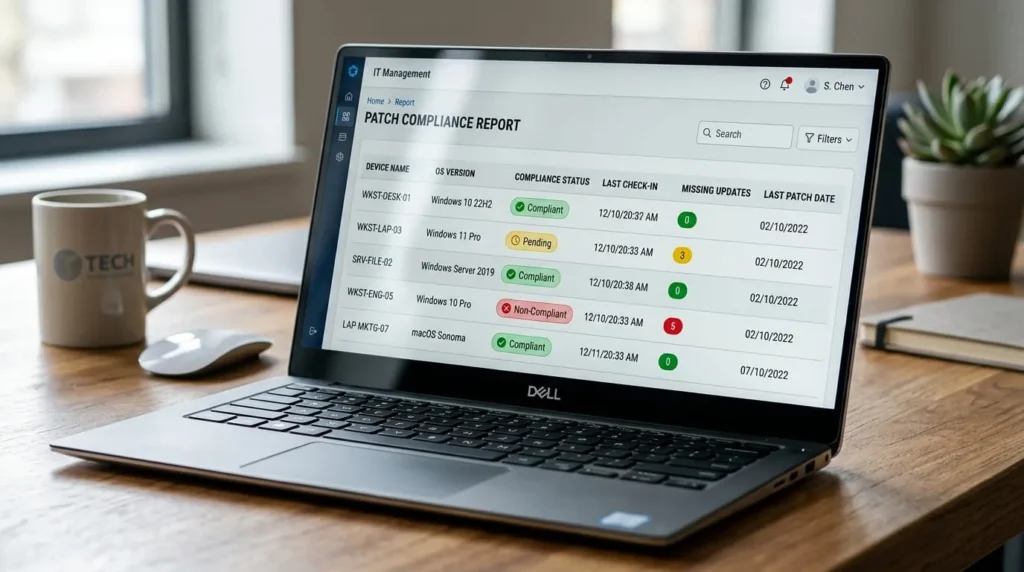
Check whether the tool can export reports in a format your auditors actually accept, such as a scheduled PDF or CSV, and how long historical reporting data is retained. A tool that only shows the current patch state is less useful for an audit than one that can show when a device fell out of compliance and when it was brought back into line.
Types of Patch Management Tools
1: Cloud-Based RMM Platforms
Remote monitoring and management platforms with built-in patching are common among smaller IT teams and managed service providers. They typically require little on-site infrastructure and update their own agents automatically, which keeps overhead low. Most bundle patching alongside remote access, asset tracking, and basic ticketing, so it’s worth weighing the whole platform rather than just its patching feature.
2: On-Premises Enterprise Suites
Larger organizations with strict data residency rules or complex approval chains often run patch management on their own servers instead of the cloud. These suites tend to offer deeper customization, including approval workflows that route certain patches through a review step, but they need more setup time and dedicated staff to run well.
3: Free and Open Source Options
Smaller teams or those on tight budgets sometimes start with free tools like WSUS for Windows-only environments, or open source options that handle basic scanning and deployment without a subscription. These generally cover fewer platforms and lack the automated third-party patching and reporting found in paid tools, so they work best as a starting point rather than a long-term enterprise solution. Support also tends to rely on community forums rather than a vendor line, which is fine for routine issues but can slow things down during an urgent patching window.
How to Match a Tool to Your Environment
Start with a real count of your endpoints, including servers, remote laptops, and any specialty devices. A tool priced and built for a few hundred endpoints behaves differently than one designed for a ten-person office.
Factor in your compliance requirements next. A healthcare or finance environment usually needs stronger reporting and audit trails than a small retail business, and that requirement should shape the shortlist before price does.
Be honest about staff capacity too. A feature-rich enterprise platform is only useful if someone has the time to configure policies, review reports, and manage exceptions. A simpler tool that actually gets used every week beats a powerful one that sits half configured, and budget conversations should include setup and ongoing tuning time, not just the license fee.
Common Mistakes That Undercut Even Good Tools
Skipping the pilot group is the most frequent one. Teams under time pressure push a patch to everyone at once, and a single bad update turns into a full afternoon of support tickets.

Ignoring third-party applications is another. Many teams patch the operating system diligently while browsers and PDF readers quietly fall months behind, which leaves an open door that the OS patching schedule never touches.
A third is treating patch management as a one-time setup instead of an ongoing process. Policies need occasional review as new software gets added and old devices get retired, or the tool’s reporting starts drifting away from what’s actually installed. Letting exceptions pile up without a review date attached causes the same problem, since a device excluded months ago for an issue that’s since been fixed can sit unpatched indefinitely if nobody circles back.
Getting Started With a New Patch Management Tool
Begin with a full inventory of devices and installed software before choosing anything, since this reveals gaps that the sales pitch won’t. Run a short pilot on a small group of low-risk devices, then expand once you trust how the tool handles failures and rollbacks.
Set a recurring maintenance window early rather than patching on an ad hoc basis, and build a habit of checking the compliance report weekly instead of only before an audit. During the first few weeks, start with the basics: scheduled OS patching and working failure notifications, then layer in third-party patching and stricter approval workflows once the team is comfortable with how the tool behaves. That routine, more than any single feature, is what keeps a patch management program from quietly falling behind.