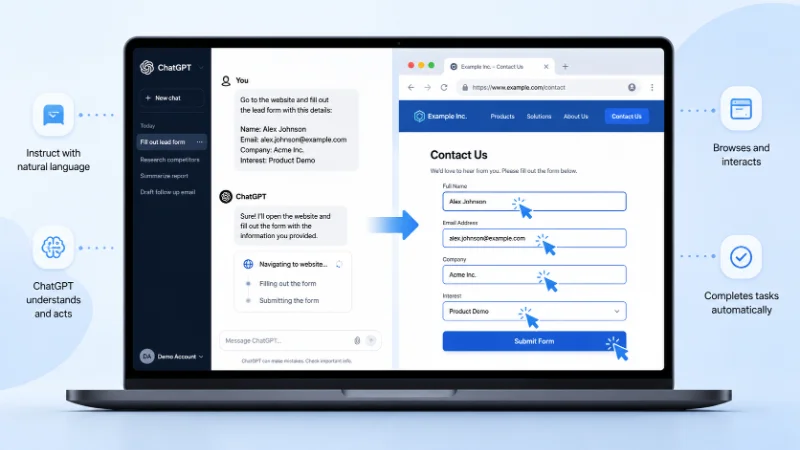
Agent mode was a ChatGPT feature that let the model use its own virtual computer to complete multi-step tasks on your behalf, rather than just answering questions in text. You gave it a goal, such as “research these five competitors and build me a slide deck,” and it browsed the web, clicked buttons, filled in forms, ran code, and returned a finished file.
If you are reading this because you saw the option in the tools menu or heard a colleague mention it, there is one thing you need to know before anything else: agent mode, as its own separate mode, no longer exists in ChatGPT. OpenAI folded its capabilities into a broader experience called Work in mid to late 2026. The rest of this article explains what agent mode did, why it mattered, and exactly where to find the same functionality today.
What Agent Mode Was Designed To Do
OpenAI launched agent mode in July 2025 as a merger of two earlier tools. Operator handled clicking and typing on websites, while deep research handled reading and summarizing large amounts of information. Neither could do the other’s job well on its own. Agent mode combined both skills into a single system that could decide, task by task, whether it needed to browse visually, read text, run a terminal command, or call an API.
In practice, that meant you could ask it to plan and buy ingredients for a dinner party, check your calendar against recent client news and brief you on upcoming meetings, or update a financial model with new numbers while keeping the existing formatting intact. The model chose its own tools and switched between them without you having to specify each step.
How Agent Mode Actually Worked
Agent mode ran on a virtual computer that stayed active for the whole task. This mattered because a typical request touched several tools in sequence: open a page in the visual browser, download a spreadsheet, edit it in a terminal command, then check the result back in the browser. Earlier tools lost context every time you switched between them. Agent mode did not.
The Toolset Behind the Model
Four tools sat underneath agent mode. A visual browser let it click and scroll on pages built for humans. A text based browser let it read and reason over large amounts of content faster, without rendering graphics it did not need. A terminal gave it the ability to run code and manipulate files directly. Direct API access let it pull structured data, such as calendar entries, without scraping a page for it.
Connectors and Logging In
Agent mode could also use ChatGPT connectors, which linked accounts like Gmail, Google Calendar, and GitHub so the model could pull real information into a task instead of guessing. For anything requiring a login it did not already have, the model paused and asked you to take over the browser. While you were typing credentials yourself, ChatGPT did not capture screenshots, which kept passwords out of your chat history.
What You Could Actually Ask It To Do
Three categories of task made up most real usage. Research tasks combined browsing with synthesis, such as benchmarking a set of transit systems against each other or compiling a competitive analysis with sourced data points. Action tasks required the model to interact with a live website, like booking a reservation or submitting an expense report, and these were the ones most likely to trigger a confirmation prompt before anything final happened. Deliverable tasks asked for a finished artifact, most often a slide deck, a spreadsheet, or a written report, built directly from research the model had just gathered.
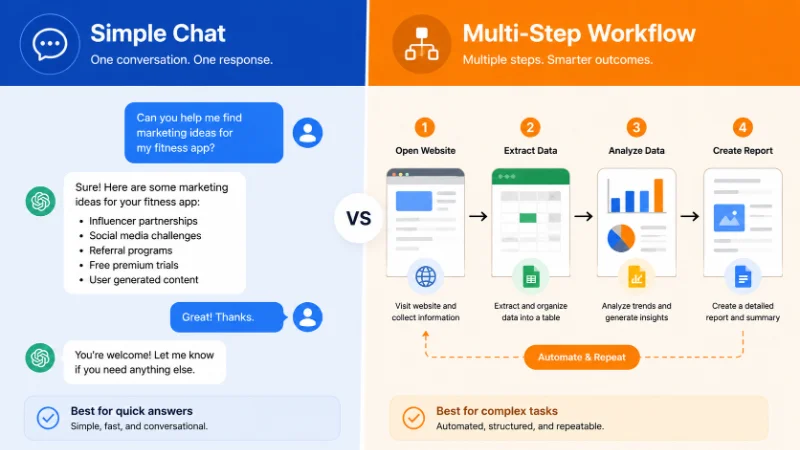
Two limitations came up constantly in real usage. Sites protected by CAPTCHA blocked the model outright, since it had no way to solve them. And tasks that changed direction partway through worked far better in ordinary conversation than in agent mode, since each agent request drew from a limited monthly allowance rather than the unlimited back and forth you get in standard chat.
Under the original message caps, Plus subscribers got 40 agent requests a month, Pro subscribers got 400, and Business and Enterprise plans matched the Plus allowance unless a workspace used flexible, credit based pricing. Only the request that started a task counted against that limit. Follow up clarifications or login steps in the middle of a task did not use up additional messages, which mattered for anyone running longer research jobs that needed a few rounds of back and forth before finishing.
Agent Mode vs Standard Chat vs Deep Research
Standard chat answers questions and drafts text instantly, with no message limit beyond normal rate limits, and it cannot touch a live website or a file on its own. Deep research sits between the two: it browses and reads extensively to produce a long, well sourced report, but it does not click through logins, fill forms, or take action on a site. Agent mode was the only one of the three that could actually do something on your behalf, such as complete a purchase or update a real spreadsheet, rather than just describe how to do it.
That extra capability came with real tradeoffs. Agent tasks typically took anywhere from a few minutes to half an hour to finish, compared to an instant response from standard chat. They also drew from a separate, much smaller monthly message allowance, so it rarely made sense to use agent mode for anything a normal conversation could handle just as well, like brainstorming headlines or revising a paragraph.
What Replaced Agent Mode
OpenAI restructured ChatGPT’s interface so that Chat and Work now sit side by side as two modes of the same product, with Codex handling software development separately. Chat is the fast, conversational experience most people already know. Work is the direct successor to agent mode: an agent built for longer, multi-step jobs that end in a finished deliverable, such as a document, spreadsheet, presentation, or research report.
The underlying idea did not change. Work still uses tools and permissions to browse, run code, and act on your behalf, and it still pauses for approval before anything consequential. What changed is packaging and access. Work is available on ChatGPT web, mobile, and desktop for eligible paid plans, and it now follows the same usage structure as Codex rather than the flat monthly message caps agent mode originally used.
How To Switch To Work Today
On desktop, open the ChatGPT app and use the toggle at the top of the page to switch from Chat to Work. On web or mobile, select Work from the same menu where you previously found agent mode, then describe the outcome you want, including any files or constraints. Work chats sync across web, mobile, and desktop, so a task you start on your phone can be picked up later at your desk.
Workspace owners on Enterprise and Edu plans get more granular control than agent mode originally offered. Access to Work can be turned on or off per role, specific apps can be enabled or disabled workspace wide, and admins can block particular websites and domains from being reached during a task. None of that role based control existed when agent mode first launched, which suggests the shift to Work was as much about giving IT teams better guardrails as it was about renaming a feature.
Safety and Privacy Considerations That Still Apply
Anything that lets a model act on your data carries more risk than a tool that only talks back to you, and that principle carried over unchanged from agent mode into Work. Prompt injection remains the main risk to understand: a malicious instruction hidden in a webpage, sometimes in invisible text or metadata, can attempt to trick the model into taking an action you never asked for, such as pulling a password reset code from your inbox and sending it somewhere else.

The safeguards built for agent mode carried over directly. The model asks for explicit confirmation before consequential actions like purchases. Certain sensitive tasks require active supervision through what OpenAI calls watch mode. High risk requests, such as initiating a bank transfer, are refused outright. You can reduce your own exposure further by enabling only the connectors a specific task actually needs, avoiding vague instructions like “check my email and handle everything,” and clearing browsing data after any session where you logged into a sensitive account
Frequently Asked Questions
1. Is agent mode still called agent mode in ChatGPT?
No. The separate “agent mode” toggle from the tools menu has been retired. The same underlying capability now lives inside Work, which you select from a toggle at the top of the ChatGPT interface instead of from a dropdown inside a chat.
2. Do I need a paid plan to use it?
Yes. Work, like agent mode before it, is limited to paid plans including Plus, Pro, Business, Enterprise, and Edu, and is not available on the free tier.
3. Can it access files on my own computer?
Only through the desktop app. Work running on web or mobile operates entirely in the cloud and cannot reach local files, but the desktop version can open a local folder or project with your permission.
4. Does it still browse the web and click on pages the way agent mode did?
Yes. Work still uses a browser, tool access, and permission based confirmations, following the same agentic approach agent mode introduced, just under a new name and a broader interface.
5. What happens to tasks that referenced “agent mode” in scheduled or recurring workflows?
Existing scheduled tasks continue to run under the current system. If you set up a recurring report or monitoring task while agent mode was still the active name, it now executes through Work without requiring you to rebuild it from scratch.
6. Is Work the same thing as Operator?
No, though the two are related. Operator was an earlier, browser only tool that agent mode absorbed and eventually replaced back in 2025. Work is the next step in that same lineage, so functionally it descends from Operator through agent mode rather than being a separate product.